PaymentsRefunds
Need to stop a payment or get your money back? Here's what you can do and when.
When can I cancel a payment?
You can cancel a payment before it's remitted to your payee in the following situations:
- The payment is still processing and hasn't been sent.
- The payment is scheduled for a future date and that date hasn't arrived yet.
- Our system hasn't begun processing the payment yet during the current day.
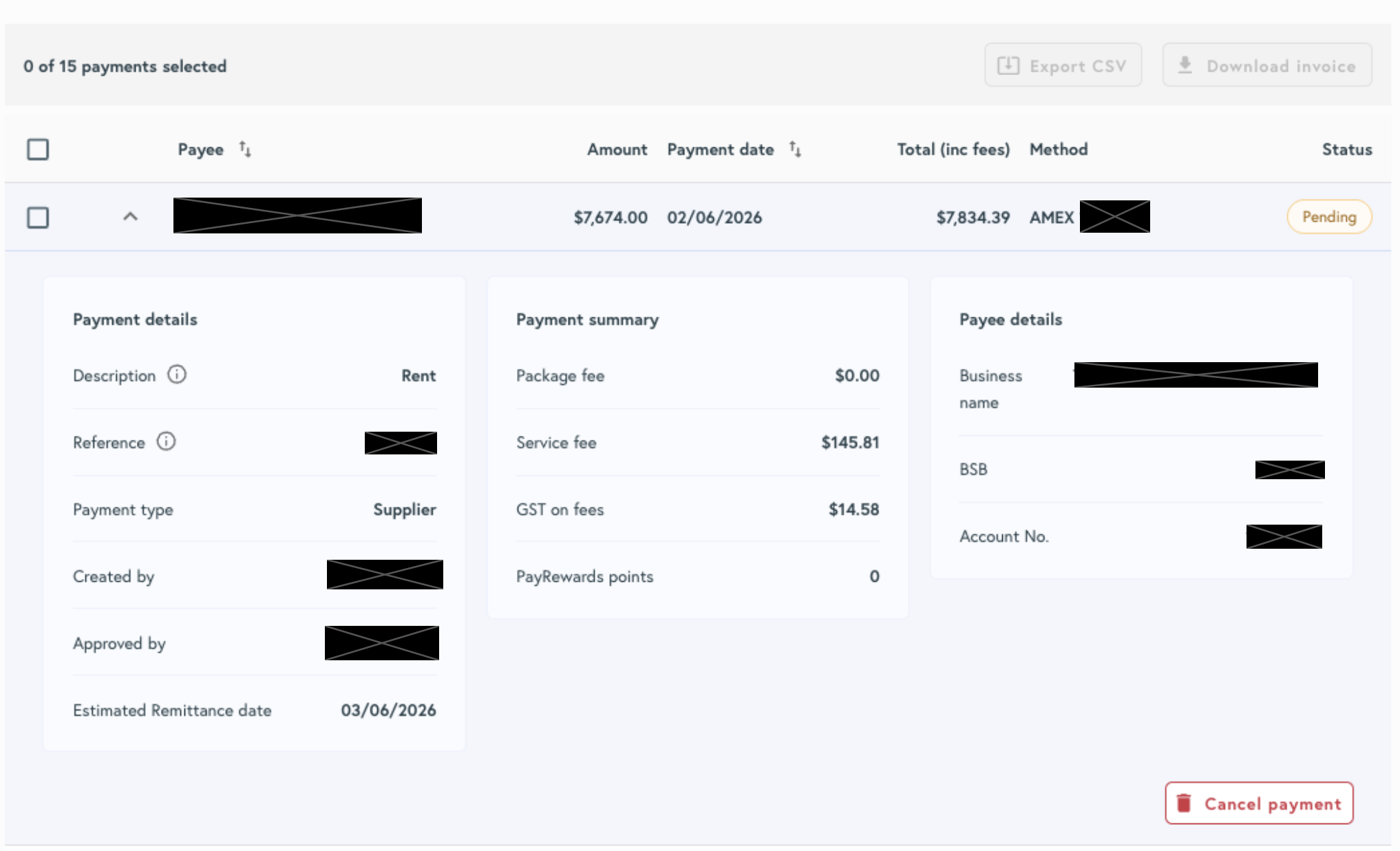
How to cancel a payment in 'Pending' status
- 1 Navigate to Payments > Outgoing Transactions
- 2 Find the payment you want to cancel.
- 3 Click on the arrow to expand the payment information.
- 4 Click on 'Cancel payment' on the bottom right hand side.
Permissions
Only Account Owners and Administrators can cancel a payment in Pending status.
How to cancel a scheduled or recurring payment
- 1 Navigate to Scheduled Payments.
- 2 Find the payment you want to cancel.
- 3 Click the ellipsis (…) on the right-hand side of the payment.
- 4 Select Cancel and remove.
- 5 Click Cancel and remove in the pop-up to confirm.
What if the payment has already been processed?
If processing has started but the payment hasn't been remitted to your payee yet, we can facilitate a refund. We need to wait for the funds to clear into our bank account first — timeframes vary by payment method.
| Original payment method | When we can initiate a refund | Time to appear back with payer |
|---|---|---|
| Bank Account (Standard Direct Debit) | After debit settlement clears to us (typically 2–3 business days) | 3–4 business days from initial authorisation |
| Bank Account (PayTo) | After debit settlement clears to us (typically same day or next business day) | 1–2 business days after settlement |
| PayID | Once inbound PayID funds settle and are matched | 1–2 business days after settlement |
| Credit Card (Visa / Mastercard / Amex) | After settlement/authorisation reversal is raised (typically same day) | 1–2 business days after settlement |
Credit card processing fees are non-refundable
Once a credit card payment has been processed, the associated processing fees cannot be refunded. See our Terms and Conditions (clause 59) for details.
How to request a refund
- 1 Locate the transaction in your dashboard and confirm its status — the payment must not have been sent.
-
2
Contact us with the following details:
- Payee name
- Payment amount
- Payment date
- 3 Our team will validate eligibility and initiate a refund to the original payment method.